The submit button is disabled.
Choose a problem, vehicle, and confirmed location. Towing also needs a destination.
Choose the service, describe the problem, select the vehicle, and confirm where help is needed.
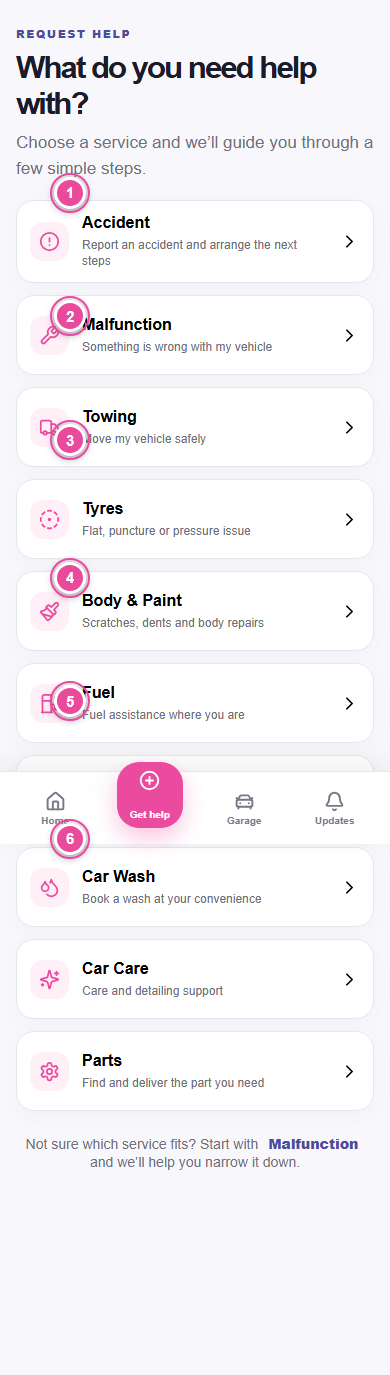
Select Accident, Malfunction, Towing, Tyres, Body & Paint, Fuel, EV Assistance, Car Wash, Car Care, or Parts.
Choose the closest problem. For Malfunction, answer the short symptom questions. PHIXTT guidance is not a final diagnosis.
Select the saved vehicle. Vehicle make, model, year, and powertrain help PHIXTT find eligible providers.
Type optional notes. Add a voice note when speaking is easier. Body & Paint asks for at least two clear damage photos.
Allow location access or enter the address manually. Towing also asks where the vehicle should be taken.
Choose Find nearby help or Find a tow truck. PHIXTT starts matching verified, service-capable providers.
Choose Find filling stations or Find charging stations to see nearby locations without creating a provider request.
Choose a problem, vehicle, and confirmed location. Towing also needs a destination.
Use Retry matching when offered or contact support. Never remain in an unsafe location while waiting.