Help Centre
Accident · AVAILABLE NOW

Report an accident and coordinate next steps

Complete safety triage, add evidence, choose insurance handling, and follow towing and body-shop providers.
Download full guide
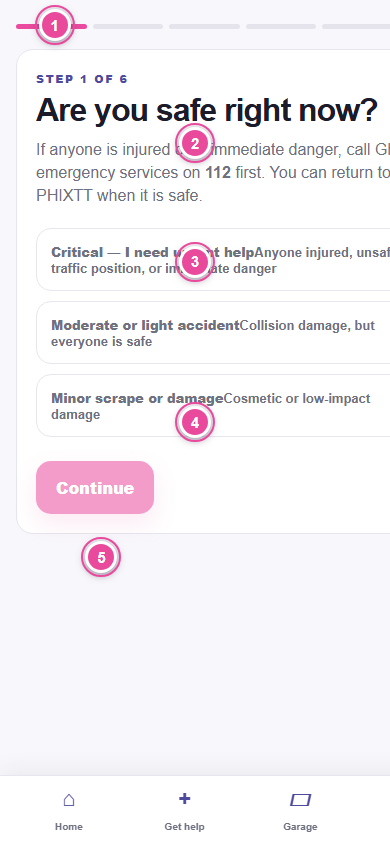
PHIXTT accident request safety screen with emergency questions, evidence, insurance, towing, and body repair steps highlighted.

Before you start

  • Check for injury, fire, smoke, traffic danger, or an unsafe location.
  • Call emergency services before using PHIXTT when anyone is in danger.

Step by step

  1. 1

    Start Accident

    Choose Accident from Get help and answer every safety question honestly.

  2. 2

    Describe the crash

    Choose severity and whether the vehicle can move. Add a plain description.

  3. 3

    Add evidence

    Upload clear scene and damage photos that are safe to take. Never stand in traffic to take a photo.

  4. 4

    Choose services

    Select towing, body repair, or both. PHIXTT coordinates each provider as a separate assignment.

  5. 5

    Handle insurance

    Use a saved policy, add a policy, or continue without saved insurance. Policy documents remain private and access is limited to authorized accident handling.

  6. 6

    Confirm pickup and destination

    Towing needs the accident location and a safe destination or body shop.

  7. 7

    Follow each provider

    Review the towing and body-shop cards separately. Verify each arrival before handoff or work begins.

  8. 8

    Review estimates and handoff

    Confirm body-shop intake, review revisions, accept the agreed work, and follow service completion.

Troubleshooting

It is unsafe to take photos.

Do not take them. Move to safety and contact emergency services first.

You do not have policy details now.

Continue without a saved policy and add details later from Account when available.

What to do next

  • Completed towing and repair remain together in Activity.
  • Rate each completed provider separately.

Related guidance

SafetyUse Safety Centre and trusted sharingActivityFollow your provider and complete serviceAccountManage your account, privacy, and support
Guide version 2026.08.17 · Reviewed 17 August 2026 · App reference 4995723