Your make or model is missing.
Search again using the manufacturer name. If it is still missing, save the closest accurate details and contact PHIXTT support.
Save the vehicle details PHIXTT uses to prepare suitable help and specialist matching.
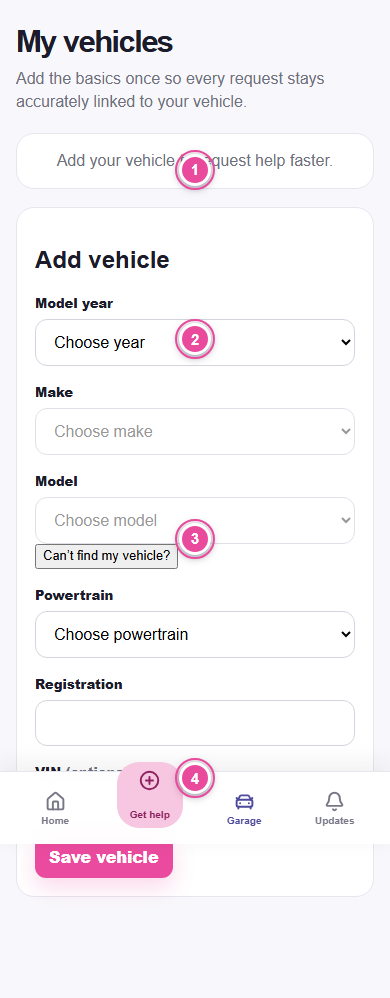
Choose Garage in the bottom navigation, then choose Add vehicle.
Select year, make, and model from the catalogue. Add the trim when you know it.
Enter the registration. You may also add the VIN to make the record more precise.
Select petrol, diesel, hybrid, plug-in hybrid, battery electric, or other, then choose the vehicle colour.
Use a clear personal photo when available. If you do not add one, PHIXTT may show an approved catalogue image or vehicle illustration.
Open Garage and choose Edit on the vehicle card. Save the corrected details.
Use the Archive button and confirm. The vehicle leaves your active Garage but remains linked to past service records.
Restore and default-vehicle controls are not currently available. PHIXTT does not show a separate Garage service-history screen yet; completed requests remain in Activity.
Search again using the manufacturer name. If it is still missing, save the closest accurate details and contact PHIXTT support.
Use JPG, PNG, or WebP under 10 MB and try again on a stable connection.